Operations
Social copying, PAMM and MAM on one set of screens
Most desks end up running more than one model, and most tools make them run more than one console to do it. The workspace puts every model, every master account and every subscription in the same place, for your team and for your investors.
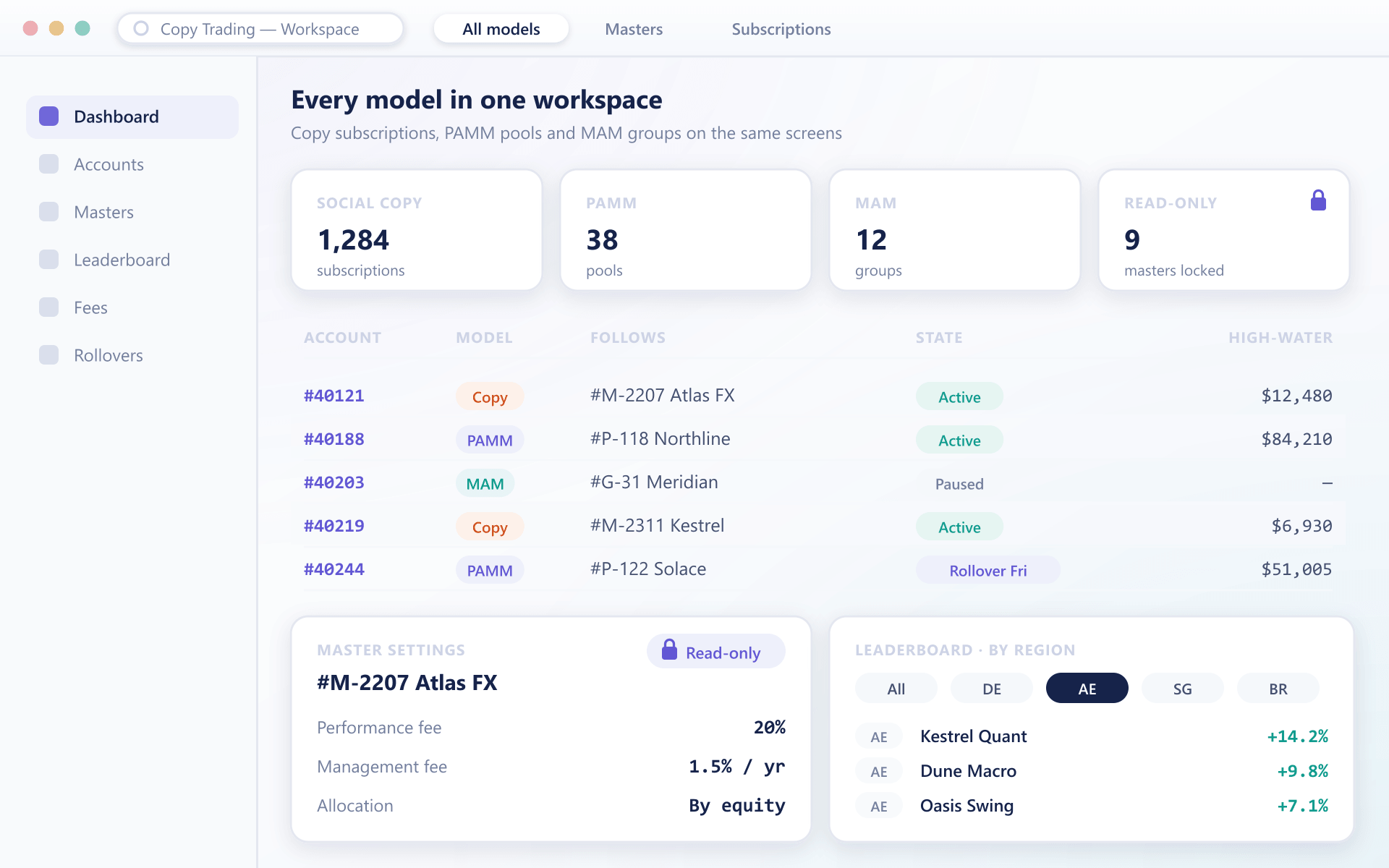
What sits in the workspace
One place to see who follows whom
The point is that a support agent, a dealer and an investor all look at the same records, filtered to what each of them is allowed to see.
Every model on one dashboard
Copy subscriptions, PAMM pools and MAM allocations appear side by side, instead of living in three modules with three sign-ins.
Linked accounts at a glance
Each account shows its subscription state and the master it follows, on the dashboard and on the account list alike.
Lock a master's settings
Switch a master account to read-only and its fee terms and allocation settings stay exactly as agreed until someone with that permission unlocks it.
Rankings by region
Filter the strategy leaderboard by country and show a flag beside each provider, so investors find managers who trade their hours and speak their language.
Fees that step down with balance
Tier management or performance fees by the investor's balance, so a larger account earns a better rate without anyone filing an exception.
Rollovers on your schedule
Choose when a PAMM pool processes deposits, withdrawals and fees, rather than living with a fixed cycle that does not suit your book.
Day to day
What gets quicker for the desk
Every login is a link
Account numbers shown anywhere in the workspace open the account they refer to, so support can trace a complaint from investor to master in two clicks.
Leverage changes without a reset
Adjust leverage on a live account without closing and reopening it, which removes one of the most common reasons for a CRM ticket.
Watermarks where people can see them
Each subscription shows its high-water mark to the investor and the admin, so nobody has to ask when the next performance fee will apply.
The same actions over the API
Opening a subscription, reading its state and changing its terms are available to your CRM through the API, so it does not have to keep its own copy.
Workspace questions
Before you consolidate
4 short answers to what teams ask before a demo.
No. The workspace shows the models you have switched on. A desk running only social copying sees only social copying, and adding PAMM later does not change where anything lives.
Only the roles you grant that permission. The lock exists to keep agreed fee terms intact, so most desks give it to compliance or a head of dealing rather than to account managers.
They see their own view of the same records: their subscriptions, the masters they follow and the fees that apply to them, under your brand and inside your client area.
They appear in the workspace with their current subscriptions and history. Nothing has to be recreated, and investors keep following the masters they already follow.
Still have a question?
A specialist will answer it directly, with your set-up in mind.
Ask a specialistSee all three models on one screen
We will load a sample book with copy, PAMM and MAM accounts so your team can judge whether one workspace replaces the consoles it uses today.