Brokerage Operations
The rails your client money actually moves on
Deposits, withdrawals, provider routing, digital assets, treasury and settlement. Not the screens your team works in — the layer underneath them, where the money is.
- 01Client
Chooses a method on a funding screen that carries your brand.
- 02Routing
The attempt goes to the provider most likely to complete it.
- 03Ledger
The movement is written once, with the fee attributed to it.
- 04Treasury
The balance lands where policy says it should sit.
- 05Payout
Money leaves on a schedule, under approval, in a batch.
See it live
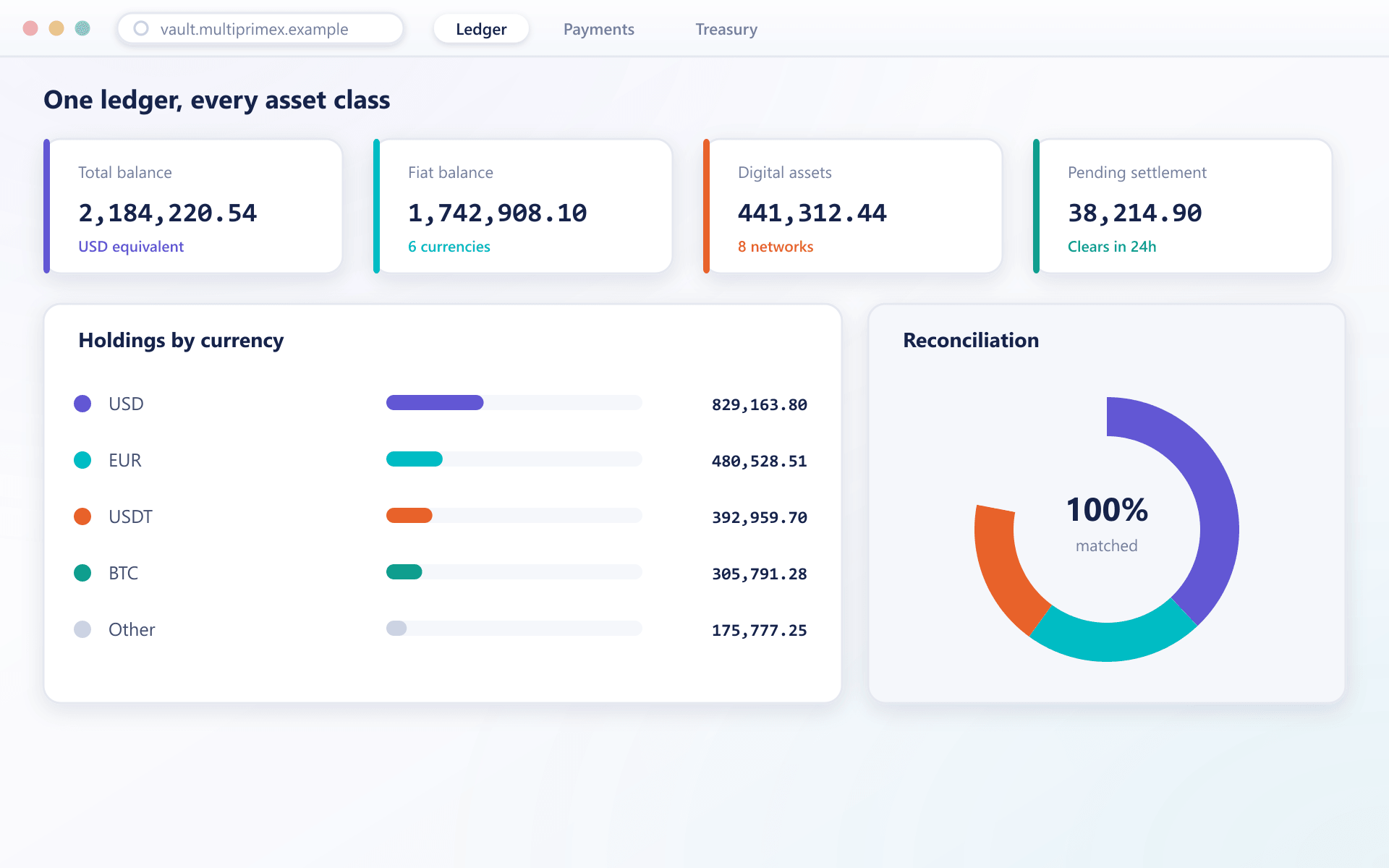
Every balance, every asset class, one ledger
Fiat and digital asset balances sit side by side, reconciled to the same treasury record your finance team already reports from.
Where funding quietly leaks
Payments rarely break loudly. They just stop converting.
Deposits that fail without a reason
A provider declines, the client sees a generic message, and support cannot say why. The client tries once more and then funds a competitor instead.
Withdrawals that take days
Manual approval queues and hand-built payout runs turn a two-minute decision into a two-day wait. Nothing damages trust faster.
Nobody owning the price move
Digital assets arrive, sit unconverted, and someone discovers weeks later that the desk carried the exposure without deciding to.
Two systems, two sets of numbers
Provider statements and the internal ledger disagree, and month end becomes an investigation instead of a reconciliation.
Both directions
One of these wins the client. The other keeps them.
Getting funded should be the easiest thing a client does
A funding screen under your brand, hosted or embedded
Routing across providers by method, currency, country and live success rate
Retries that never double-charge, because every request is idempotent
Digital assets credited on a confirmation policy you set per network
Getting paid back is what clients tell other people about
Destination validation and source-of-funds matching before approval
Approval routing above thresholds, with four-eyes where it matters
Batched, scheduled payout runs rather than hand-assembled ones
Partial failures isolated, so one bad destination does not stall the run
Where the line sits
BrokerOS is the console. PayVault is the rails.
They are sold separately and they work best together. This is the split, stated plainly so nobody has to guess which product does what.
BrokerOS
Where your operations team works: the withdrawal queue, the client record, the approval screen, the daily reconciliation. Human decisions and the surfaces that support them.
About BrokerOSPayVault
What sits underneath: the provider connections, the payment ledger, the wallets, the treasury and the settlement records. The movement itself, and the controls around it.
Controls
Every movement is decided before it happens and provable afterwards
Screened before it moves
Address screening and source-of-funds signals run on the payment path, not on a report produced the following morning.
Limits that actually stop things
Per-client, per-method and per-period thresholds are enforced at request time rather than flagged after settlement.
Movement needs authority
Anything leaving treasury requires approval appropriate to its size, with multi-party sign-off above a threshold you set.
One record, reconcilable
Settlement reporting derives from the same ledger entries as client statements, so the two cannot drift apart.
Moving across
Nobody switches payment rails in one weekend
Deposits move first and prove themselves, then payouts, then the old arrangement is retired — never the other way round.
- 1
Connect
Your existing providers are connected first and run alongside whatever you use today, receiving no live traffic until the behaviour is understood.
- 2
Route
A share of funding attempts moves across so routing, retries and crediting can be measured against your current numbers rather than against a claim.
- 3
Settle
Payouts, treasury and settlement reporting move once deposits are proven, because the outbound side is the one clients notice when it goes wrong.
- 4
Consolidate
The old arrangement is retired only when the ledgers agree for a full period on both sides.
Explore
Five areas, and most desks start with the first
FAQ
PayVault: common questions
6 short answers to what teams ask before a demo.
PayVault is the MultiPrimeX payment layer for brokerages: client deposits and withdrawals across payment providers, digital-asset processing, treasury and custody, and the limits, monitoring and settlement records around client money.
Yes. Each payment attempt is routed by method, currency, country, amount and live success rate, with automatic failover and retries that never charge the client twice.
Yes. Digital assets are handled as a payment rail, with per-asset confirmation thresholds, under- and overpayment handling, optional conversion on receipt, and on- and off-ramps between fiat and crypto.
Withdrawals pass destination checks, source-of-funds matching and approval routing above thresholds you set, with per-client, per-method and per-period limits enforced at the moment of the request.
Yes: an idempotent payments API, signed webhooks with replay, and a sandbox that reproduces declines, timeouts, underpayments and duplicate callbacks on demand.
It sits underneath the client area. BrokerOS shows funding to clients and operators while PayVault moves and records the money, and it can run beside your own CRM through the API.
Still have a question?
A specialist will answer it directly, with your set-up in mind.
Ask a specialistBring us your deposit failure rate
It is the one number that tells us most about your current setup, and the one most desks have never been shown.