MultiPrimeX Product
Everything that happens around the trade
A client signs up, verifies, funds, trades, withdraws and asks questions. BrokerOS is every one of those steps, in your branding, with the operations console your desk works from behind it.
Client area
yourbrand.comTotal value
- 137 087.52
Accounts
- 2 live · 1 demo
Verification
- Tier 3 · complete
Pending
- 1 deposit confirming
No provider name appears anywhere a client can reach
Payment providers connectable
Verification providers supported
Typical onboarding to funded
Figures are indicative of platform capability and are confirmed against your own provider list during scoping.
0+
Payment providers connectable
Indicative0+
Verification providers supported
Indicative0+
Integrations across the stack
Indicative<1 day
Typical onboarding to funded
IndicativeSee it live
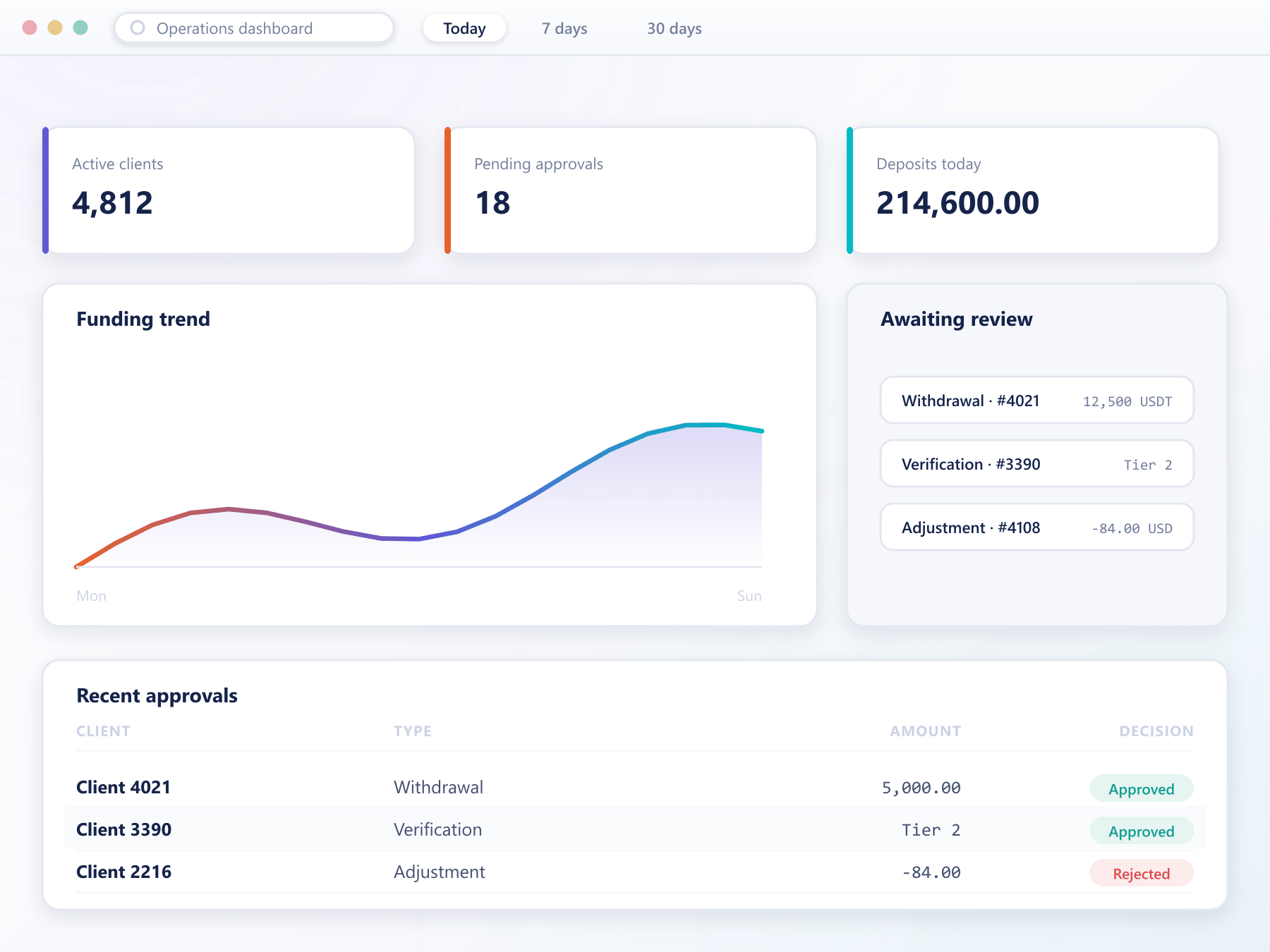
The whole desk in one dashboard
Client activity, funding and performance surface on the same operations dashboard your support and risk teams already work from.
The client journey
Six steps, and every one of them can lose you the client
Most brokerages lose more prospects between signup and first trade than they ever lose to competitors. These are the six steps and what BrokerOS does at each.
A short form, immediate verification of contact details, and a usable account. Documents are requested when a permission actually requires them, not before.
Document capture happens in your client area and is handed to the provider you already contract with. Status changes push back without a support ticket.
Available methods are resolved from the client group and jurisdiction, so a regional rail is offered only where it is relevant and never elsewhere.
Trading accounts are created, funded and monitored from the client area, with balances reconciling to the trading platform rather than being reported separately.
Requests carry the safeguards you configure and land in the approval queue with the full client context beside them.
History, statements, verification status and payment progress are all visible to the client, which removes the bulk of routine support contact.
What the client sees
One account area, from first signup to steady trading
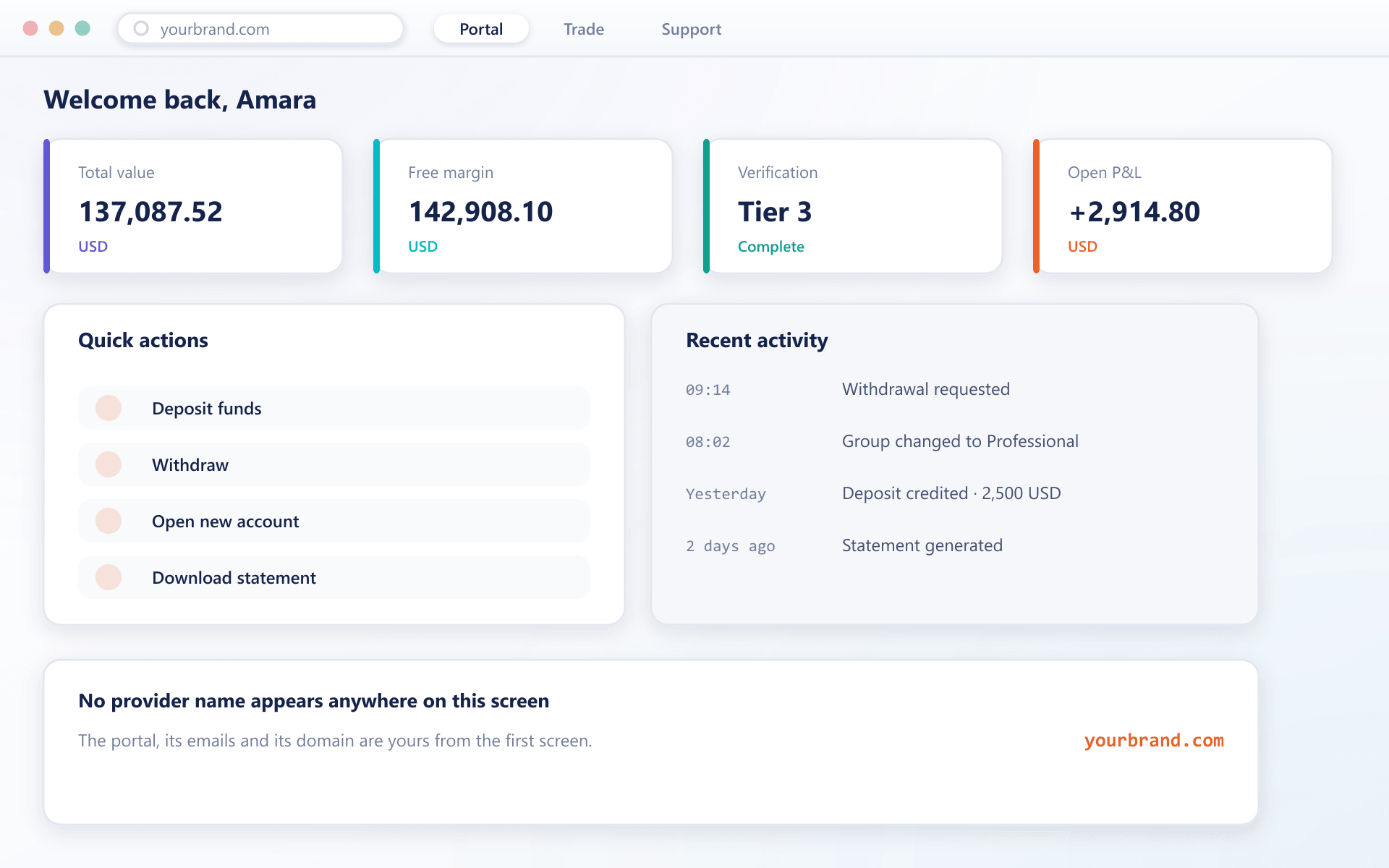
Everything a client needs to fund, verify and trade sits behind a single login, branded as yours. Each surface below is a real part of the product, not a concept.
A home screen that answers the obvious questions
Balance, open accounts, verification state and anything waiting on the client are visible without navigating. The layout adapts to what the account actually has enabled rather than showing empty modules.
Balances across every wallet and account in one place
Outstanding actions surfaced instead of buried in menus
Operations console
One screen your desk actually works in
Client records, approval queues, payment operations and reporting share a single console with role-based permissions, so a support agent and a risk manager see different tools in the same place.
Client records
Full history, balances, documents, communications and activity on one record.
Approval queues
Withdrawals, verification and manual adjustments with the context needed to decide.
Role-based access
Each operator sees only what their role needs, and every action is attributed.
Bulk operations
Group changes, communications and adjustments applied across a segment at once.
Payments
Connect the providers you already use
BrokerOS routes to payment providers rather than replacing them. Which methods appear, in what order, and with what limits is resolved per client group and jurisdiction.
Routing and fallback
A failing provider is bypassed automatically so a deposit attempt does not simply fail.
Reconciliation built in
Every movement writes a ledger entry referencing the provider transaction.
Partners and IB
Growth that never becomes a reconciliation job
Referral tracking, commission calculation and payouts are part of the platform, so growth does not turn into a monthly reconciliation exercise.
Apply
Partners apply through your client area and are approved by your team with the tier you choose.
Promote
Each partner gets tracked links and materials in your branding, with attribution that survives the signup flow.
Refer
Referred clients attach to the partner at registration and stay attached for the account lifetime.
Earn
Commission accrues per qualifying event and is visible to both the partner and your desk in real time.
What your team sees
The console your operations desk actually works in
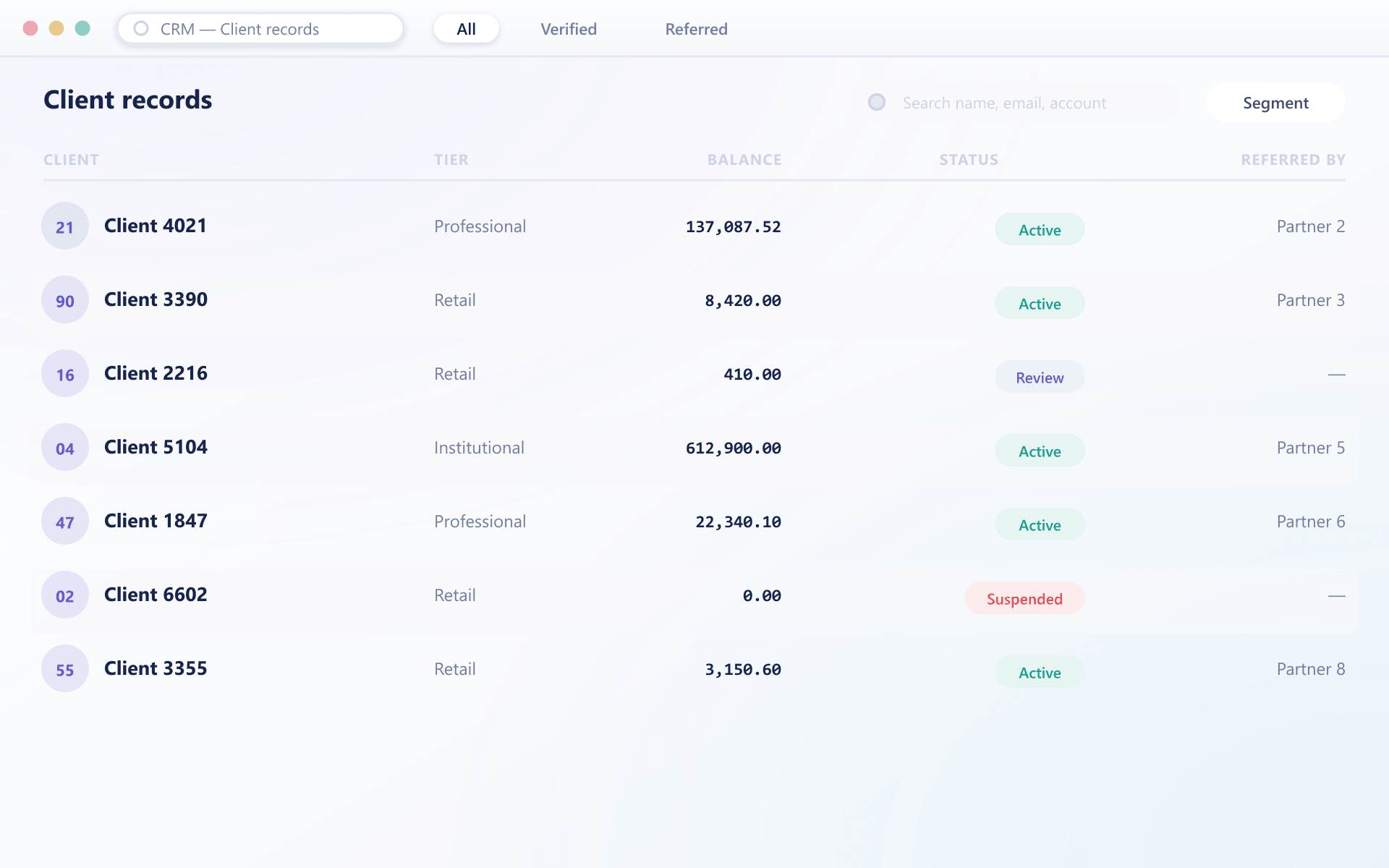
Client records, money movement and approvals live in one place, with every action attributed and retained. These are the screens your staff open each morning.
One record per client, with the history attached
Contact details, verification state, accounts, balances and past requests sit on a single record. Filters and saved segments let a desk work a list rather than searching one client at a time.
Segments and filters your team can save and share
Full history retained against the record
Compliance
Controls in the path, not in a report
Verification, screening and retention are part of onboarding and funding rather than a review that happens afterwards, which is what makes them defensible.
Verification tiers
Permissions unlock as verification levels are reached, enforced by the platform.
Screening in the flow
Clients and transfers are screened through your provider before anything completes.
Jurisdiction rules
What a client may access is resolved from their jurisdiction rather than a policy document.
Retention and export
Records retained to your policy and exportable in the form a regulator asks for.
“Our support queue halved in the first month, and not because we hired. Clients simply stopped asking us things they could now see for themselves.”
Head of Client Operations
Multi-asset brokerage, EMEA
Your domain
Client area and API endpoints on your address, with certificates issued during onboarding.
Applied as configuration
Branding is a configuration set rather than a code fork, so a refresh is applied not rebuilt.
Emails from you
Verification, alerts and statements use your templates and your sending domain.
White label
Your brand, from the first screen to the last email
Domain, logo, colour system, typography and email templates across the client area and the mobile apps, with no reference to the underlying provider anywhere.
White label in detailGetting live
From contract to first funded client
Three phases. The variable is how quickly your payment and verification providers issue credentials.
- Days 1–3
Environment and brand
Your instance is provisioned, domain and certificates attached and the brand pack applied. Your team receives console access.
- Days 4–7
Providers and rules
Payment and verification providers are connected, client groups defined, and jurisdiction rules and limits entered.
- Days 8–10
Testing and handover
The full journey is exercised end to end, your operations team is walked through the console, and the runbook is handed over.
Build or adopt
What it takes to stand this up yourself
Every capability below is something a brokerage needs on day one. The question is whether your team builds and maintains it, or inherits it already running.
Client area and onboarding
Branded portal, progressive verification and account opening out of the box
Front end, identity flows and state machine designed and built from scratch
Payment provider connections
Connected through one integration layer, routed by rules you configure
A separate integration, reconciliation path and failure mode per provider
Verification providers
Swappable behind a single onboarding flow
Each provider wired individually, with its own retry and review handling
Partner and IB programmes
Tiers, tracking and payout runs included
Attribution, commission maths and payout scheduling built and reconciled
Back office and approvals
Roles, thresholds and audit trail configured rather than coded
An internal admin tool that competes with product work for engineering time
Reporting and reconciliation
Provider statements matched and exports ready for audit
Spreadsheets until someone is funded to replace them
Ongoing maintenance
Provider changes and platform updates absorbed on our side
Every provider API change becomes your team's release
Operational safety
Controls that hold up when something goes wrong
Security here is less about a certificate on a page and more about what the system does on an ordinary Tuesday when a withdrawal looks unusual.
Least access by default
Roles grant the actions a job needs and nothing beyond it. Sensitive operations can require a second approver before they take effect.
An audit trail you can answer questions from
Who changed what, when, and from where is retained for every material action, including configuration changes and manual overrides.
Separation between client and operator surfaces
The client area and the back office are distinct surfaces with distinct sessions, so a compromised client credential does not reach operator tooling.
Recovery that has been rehearsed
Backups, restore paths and failover behaviour are defined ahead of time rather than improvised during an incident.
Integrations
Connects to the providers you already run
Payments, verification, support, marketing and analytics are integrations rather than replacements. If you have a provider, we connect it.
Payment providers
Digital asset processing
Identity verification
Transaction screening
Support desks
Marketing automation
Product analytics
Trading platforms
On a phone
The client area is built for the device most clients actually use
Rather than a cut-down mobile view, the same client area adapts to the screen. It can be installed to a home screen and opened like an app, without going through an app store.
Installable from the browser
Clients add it to their home screen and it opens full screen, with your icon and your brand.
Nothing missing on a small screen
Funding, verification, accounts and statements all work on a phone rather than pushing clients to a desktop.
Native builds when you want them
Branded builds for both mobile app stores are available as a one-off add-on when your market expects a store listing.
Localisation
One deployment, every language your market speaks
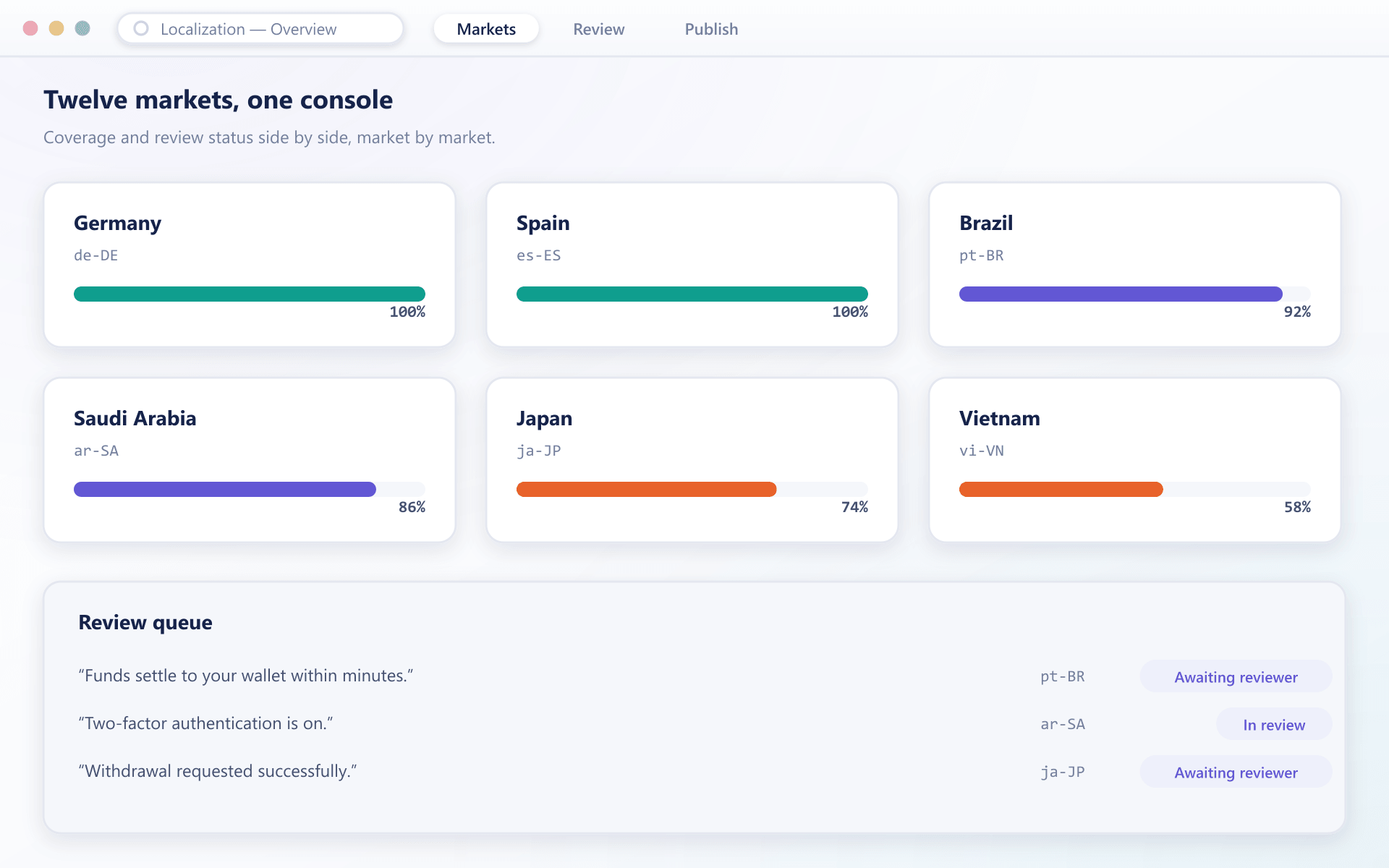
The client area, emails and statements are translated through the Localization Module rather than forked per region. Adding a language is a content task, not a release.
Financial wording held steady
Trading terminology is fixed in a glossary so the same instrument is never described two ways across languages.
Right-to-left handled properly
Layout mirrors for right-to-left scripts instead of stretching a left-to-right design to fit them.
Published without a deploy
Corrections reach the live client area directly, so a wrong word does not wait for the next release window.
Product ecosystem
One-Stop Shop for the Entire Fintech Ecosystem
0
Asset classes
Indicative0+
Instruments
Indicative6–8 wks
Time to live
Indicative24/7
Institutional support
IndicativeExplore the platform
Every part of BrokerOS, documented
Grouped by who uses it: clients live in the client area, your team lives in the back office. Pick a section to see what each side gets.
Questions we get asked
Before you talk to us
6 short answers to what teams ask before a demo.
Yes. Client records, verification state, account mappings and balances can be imported, and we run the migration against a sandbox first so you can check the result before anything touches production.
No. It sits above the platforms rather than replacing them, so you can run one platform or several behind the same client identity and add another later without re-onboarding anyone.
Payment routing, verification steps, account types, roles, approval thresholds, notification templates and partner programmes are all configuration. Development is only needed when you want behaviour the product does not model.
Yours. Domain, logo, palette, typography and email templates are set per brand, and nothing in the interface refers to us.
Yes, through the same integration layer the bundled providers use. Once connected it is routed by the same rules as any other method.
We absorb it. Provider maintenance is on our side of the line, which is the main practical difference between adopting this and building it yourself.
Still have a question?
A specialist will answer it directly, with your set-up in mind.
Ask a specialist