Workflow
A draft should never be one click from a client screen
Most localisation tools present a translation as a field you type into and save. That model has no room for review, no way to stage a launch, and no way back.
See it live
A branch, reviewed as a set, before it ever ships
The console groups related strings into one reviewable change, so a feature’s copy merges complete rather than arriving one string at a time.
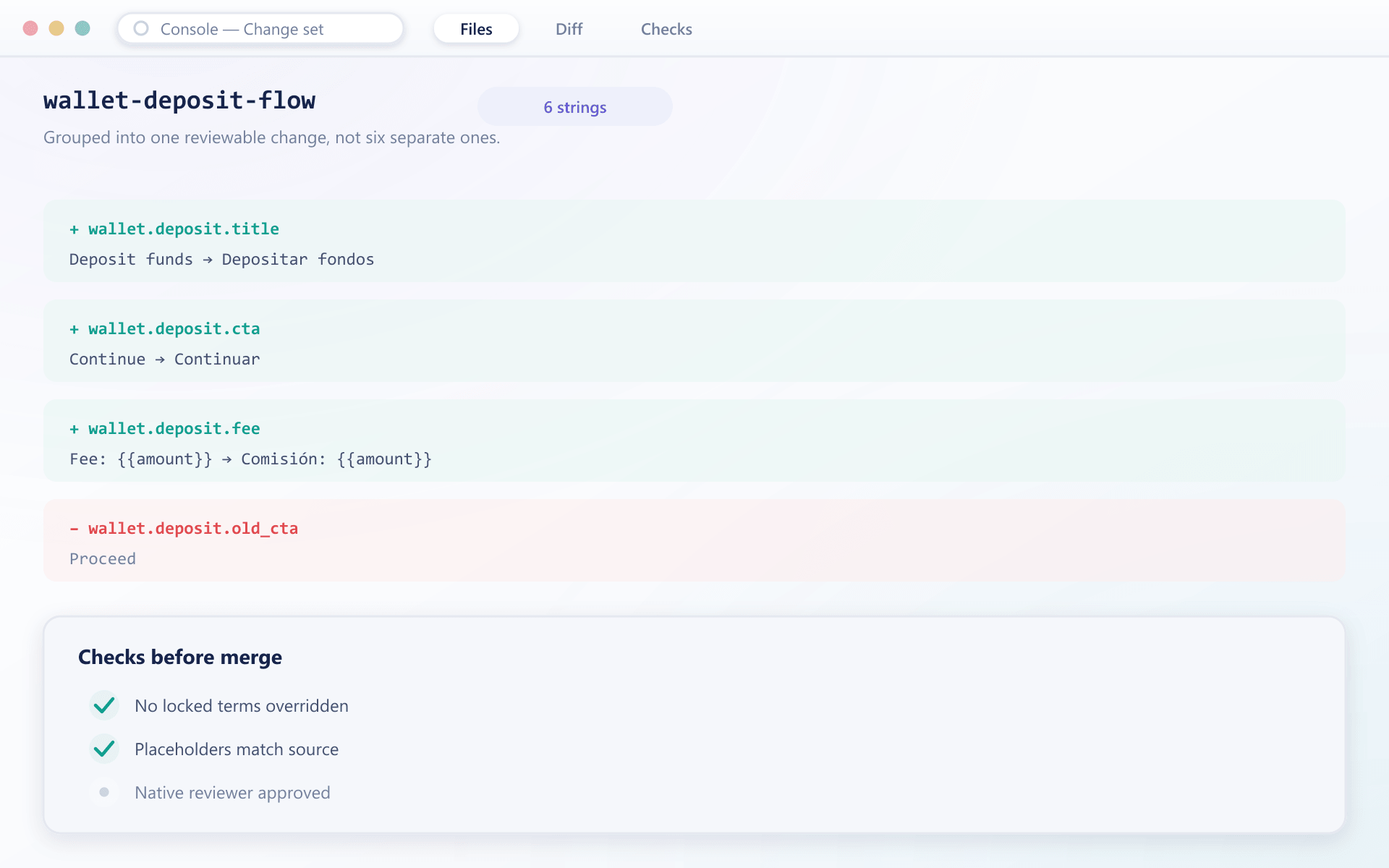
Four stages
The same shape a code change goes through, for the same reasons
Branch
A set of related changes is opened as a unit — a new feature's copy, a market launch, a terminology correction across every language. Work in progress cannot leak into production.
Edit
Translators work inside the branch with the glossary applied and context available, seeing where each string appears rather than guessing from the text alone.
Review
The whole branch is examined together, which is how inconsistency between related strings gets caught. Reviewing one string at a time reliably misses it.
Merge
Approved changes publish as a set, so a feature's copy arrives complete rather than half of it appearing while the rest is still being worked on.
Why it is worth the structure
Three things a save button cannot do
Related strings change together
A button label, its tooltip and the confirmation message that follows are one change. Editing them separately over three days produces a screen that contradicts itself in between.
History is the undo
Every version is retained with its author and timestamp. Copy that reads badly in production reverts in seconds rather than being rewritten from memory under pressure.
Launches can be staged
A branch can be prepared weeks ahead and merged on the day. Market launches stop depending on somebody being available to paste text at the right moment.
FAQ
Translation workflow: common questions
6 short answers to what teams ask before a demo.
Because related strings change together. A button, its tooltip and its confirmation message are one change, and editing them separately over several days produces a screen that contradicts itself in the interim.
No. Work inside a branch is invisible to production until the branch is merged, and merging requires approval. This is the specific failure the structure exists to prevent.
Yes, and it is one of the more useful properties. A branch can be built and reviewed weeks ahead and merged on the launch day, so going live is a decision rather than a scramble.
The conflict is surfaced at merge with both versions shown, and a reviewer chooses. Silently taking the later edit is how a carefully agreed translation gets replaced by a quick one.
Yes, and quickly. Every version is retained with its author and timestamp, so reverting is selecting a previous version rather than reconstructing it from memory.
A single typo correction can go through a lightweight path. The branch structure exists for sets of related changes, which is what most real work turns out to be.
Still have a question?
A specialist will answer it directly, with your set-up in mind.
Ask a specialistHow did your last copy change reach production?
If the answer involves a developer, a deployment and a spreadsheet, this is the part worth changing first.