Risk & Accounts
When equity runs out, the rules close the book
A margin call that nobody acts on is just a notification. In BridgeX, an account that reaches its stop-out level is closed out by the hub itself, in the order you set, at once, and with a record of every step, so a bad night does not turn into a debt you have to chase.
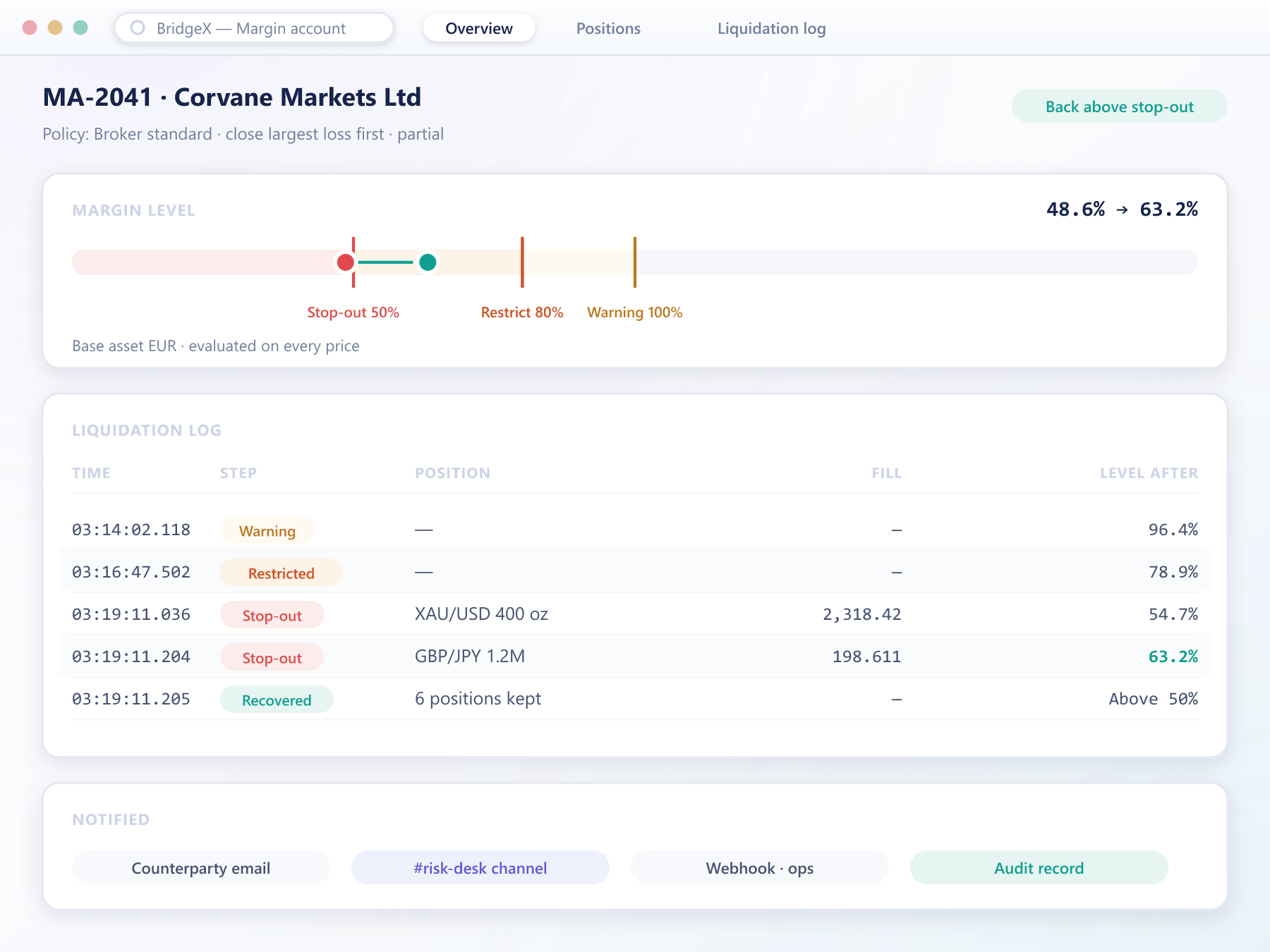
What the hub enforces
Liquidation as configuration, not a phone call
Stop-out is the last of the staged margin levels. Everything about how it behaves is set per account or per group before it is ever needed.
Watched on every price
Equity and margin level are recalculated as prices move, so the stop-out level is checked continuously rather than at the end of a batch.
A close-out order you choose
Close the largest loss first, the largest margin consumer first, or everything at once. The sequence is part of the account's margin policy.
Partial or full closure
Close positions one at a time until the margin level is back above stop-out, or close the whole account when the level is hit.
Executed through normal routing
Liquidation orders pass through the same routing and execution model as any other order, so the price is set by the market and not by the hub.
Everyone told at once
The counterparty, your risk desk and any channel you configure are notified when a warning is crossed and again when liquidation starts and ends.
A record that settles disputes
Each step is logged with the margin level, the price, the order sent and the fill received, so the sequence can be replayed if anyone questions it.
The sequence
From warning to closed position
Warning level
The margin level falls through the first threshold. The counterparty and the desk are notified and nothing else changes.
Restriction level
New positions that would add exposure are refused. Reducing orders are still accepted so the account can repair itself.
Stop-out level
The hub starts closing positions in the configured order and checks the margin level again after every fill.
Back above the line
With partial closure, liquidation stops as soon as the level recovers. The full sequence is written to the audit record.
Liquidation questions
What happens at the stop-out level
5 short answers to what teams ask before a demo.
Yes. Warning, restriction and stop-out levels belong to the margin policy, which can be set per account or inherited from a group. An institutional account and a broker account rarely share the same tolerance.
Only if you configure it that way. Partial closure works through positions in the order you set and stops as soon as the margin level is back above stop-out, which usually leaves the rest of the book intact.
At the market. Liquidation orders go through the normal routing rules and execution model, so they are filled at the prices your providers make, and every fill is recorded.
The desk can add margin, reduce positions or close the account manually at any point before stop-out. Once the stop-out level is reached the rules run, which is what protects you when nobody is watching.
Levels are evaluated in the account's own base asset, so a stop-out threshold means the same thing on the console, on the statement and in the notification the counterparty receives.
Still have a question?
A specialist will answer it directly, with your set-up in mind.
Ask a specialistWatch a stop-out run on a staging hub
We will push a test account through warning, restriction and stop-out so your risk team can read the log it leaves behind.