Accounts
Different clients get different conditions, from one deployment
A retail client, a professional and an institutional counterparty should not see the same leverage, the same spreads or the same order set. In TradeX that difference is a client group, and everything commercial hangs off it.
Retail
TierCapped leverage, simple ticket, jurisdiction defaults
Professional
TierWider instruments, advanced orders, negotiated pricing
Institutional
TierBespoke terms, FIX access, dedicated limits
See it live
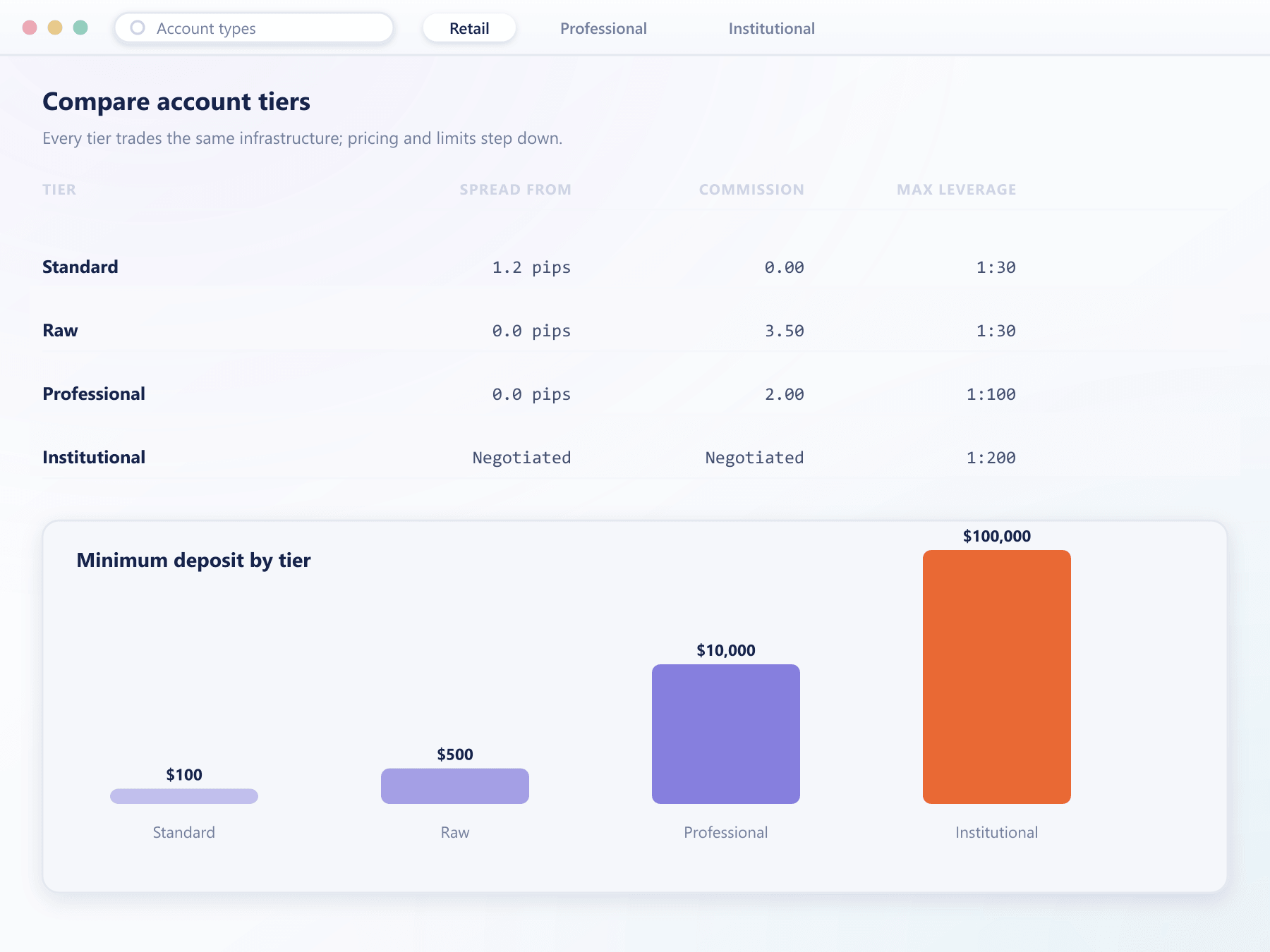
Three tiers, one schedule to configure
Leverage, instrument access and order permissions for retail, professional and institutional clients sit in a single schedule, so your desk compares terms and adjusts a band without leaving the console.
The ladder
The same instrument, three sets of terms
Nothing is duplicated. One instrument definition is read through whichever group the client belongs to.
Retail
Instrument set
core
Leverage
regulator cap
Order types
market, limit, stop
Professional
Instrument set
extended
Leverage
tiered bands
Order types
full set
Institutional
BespokeInstrument set
full
Leverage
negotiated
Order types
full set + API
What a group controls
Everything a client sees, trades and pays
Instrument visibility
An unlicensed asset class never appears
Leverage & margin
Bands and liquidation thresholds per tier
Fee schedules
Commission, markup and swap treatment
Order permissions
Advanced types reserved for who needs them
Funding routes
Rails resolved per jurisdiction
Inheritance
A shared baseline, overridden per tier
How it works
How a client ends up on the right terms
Four moments, and only one of them needs a person.
At registration
A group is assigned, never left blank
The signup route, detected jurisdiction and any partner attribution decide the default group before the account exists.
On verification
Reaching a tier can promote automatically
A completed check moves the account into a group with wider permissions, so trading unlocks without your desk touching it.
Any time
Your desk moves anyone in one action
New conditions apply from the next order. Existing positions keep the terms they were opened under.
In bulk
Edit the group, not the clients
Changing a group property updates every client in it at once, with no migration window where terms disagree.
FAQ
Account types and groups: common questions
5 short answers to what teams ask before a demo.
There is no fixed limit. Most desks run between four and a dozen, but the structure supports as many as your commercial and regulatory model needs, including groups created for a single institutional counterparty.
Instrument visibility, leverage and margin parameters, fee and commission schedules, permitted order types, funding routes, withdrawal safeguards and platform limits. If a condition differs between two clients, it is almost always a group property.
No. Existing positions keep the terms they were opened under. The new group's conditions apply from the next order onward, so a tier change never retroactively alters a client's margin or fees.
Yes. Assignment can follow the signup route, the detected jurisdiction, partner attribution or the verification level reached. Manual moves by your operators remain available at any point.
Yes. A group can inherit from a parent and override only the properties that differ. This keeps a shared baseline in one place rather than duplicated across every tier.
Still have a question?
A specialist will answer it directly, with your set-up in mind.
Ask a specialistMap your client tiers onto the platform
Bring your current segmentation and we will build it as groups with inheritance during the call.