More Capabilities
Trading built for the phone, not shrunk onto it
Most clients now check positions on a phone and many trade there. The TradeX mobile apps put orders on the chart, carry a trader's settings between devices and come in three shapes: inside the full client app, as a standalone trading app, or as screens embedded in an app you already run.
What is different on mobile
Designed around a thumb and a small screen
The engine, validation and order types are identical to the web terminal. What changes is how a trader reaches them.
Orders on the chart
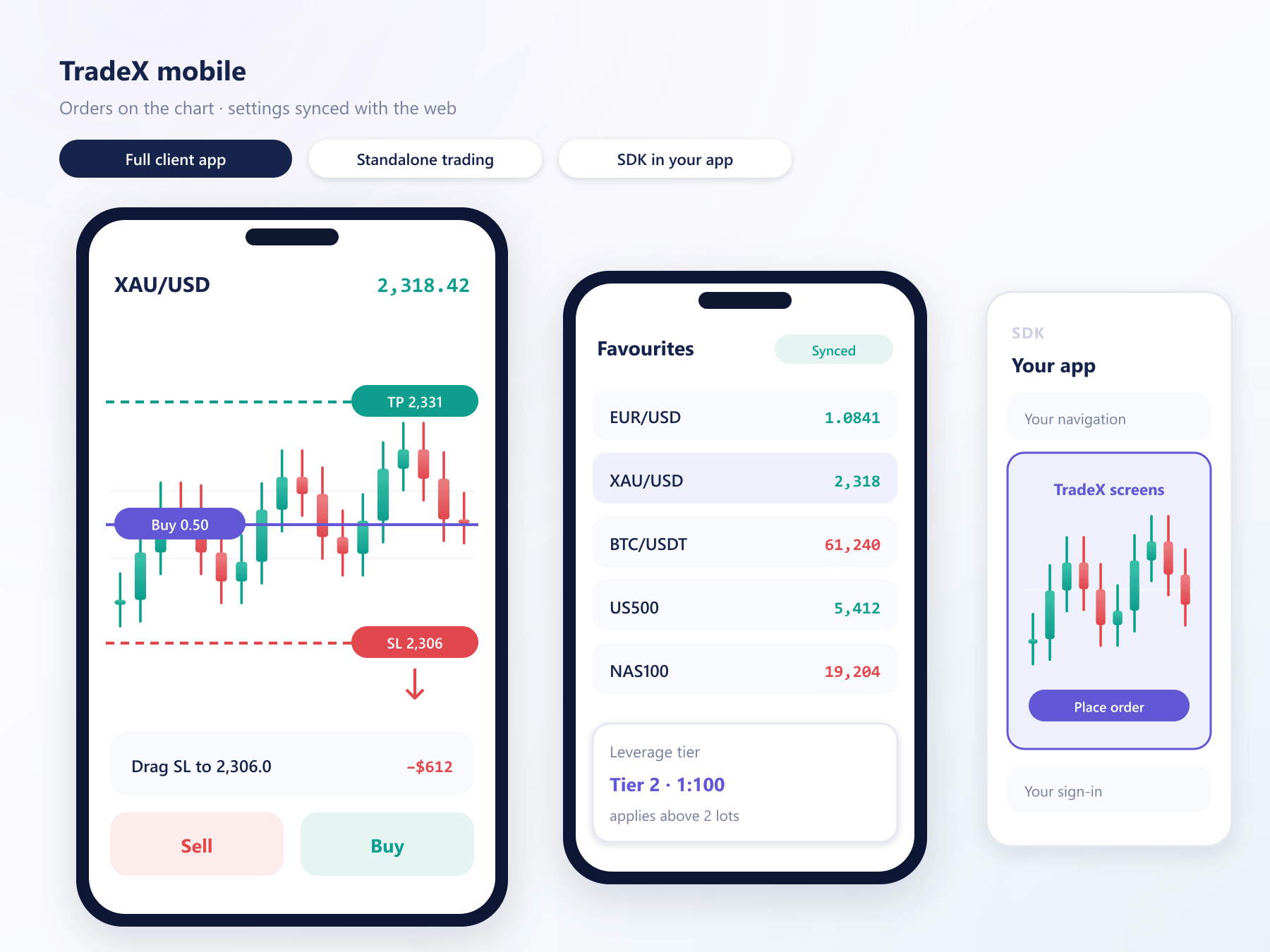
Place an order at a price level by tapping the chart, then drag stop-loss and take-profit lines to adjust them, with the change confirmed before it is sent.
Faster order entry
Saved order sizes, one-tap close and a compact ticket keep the common actions to a single screen.
Settings that follow the trader
Watchlists, favourite markets and chart layouts sync between the web terminal and the apps, so a setup made at a desk is there on the phone.
Leverage tiers in plain view
Where leverage steps down with position size, the ticket shows which tier the order falls into before it is placed.
AI insights on the go
The same AI market reading available in the web terminal is one tap away from any instrument in the app.
Demo inside the app
A demo account can be opened and switched to from within the app, so practice and live trading sit side by side.
Three ways to ship it
Pick the shape that fits your clients
The full client app
Registration, verification, funding, trading and withdrawal in one app under your brand.
A standalone trading app
Trading only, for brokers whose client area lives elsewhere or who want a lighter app for active traders.
Embedded with the SDK
Trading screens dropped into an app you already run, signed in through your own session, styled to match.
Same engine underneath
Whichever shape you choose, orders reach the same engine with the same rules as the web terminal.
Mobile questions
Before you choose a mobile route
4 short answers to what teams ask before a demo.
The trading screens, packaged to embed in an existing mobile app. Your app keeps its own navigation and sign-in, and the embedded screens talk to TradeX for prices, orders and positions.
No. It is the trading part of the full app, built on its own. Accounts, orders and history are the same as on the web terminal and the full app.
Yes. Stop-loss and take-profit appear as lines on the chart and can be dragged to a new level. The new level is shown with its distance and risk before the change is confirmed.
Yes. Builds carry your name, icon and colours and are listed under your own developer accounts in both mobile app stores.
Still have a question?
A specialist will answer it directly, with your set-up in mind.
Ask a specialistTry the apps on your own phone
We will send a test build so your team can place, move and close orders on the chart before deciding which mobile route suits your clients.